

I’ve never managed to get on board with any hydration trackers. I’ll log the foods I eat, the exercise I do, but drinks just happen. Did I have one glass of water or two with lunch? Hell if I know. Not to mention that your hydration depends on all the H2O you take in, not just the glasses of plain water. You can hydrate with soup, with Diet Coke, or with slices of watermelon. Most hydration apps forget this, but even if they don’t, that just makes logging even more complicated.
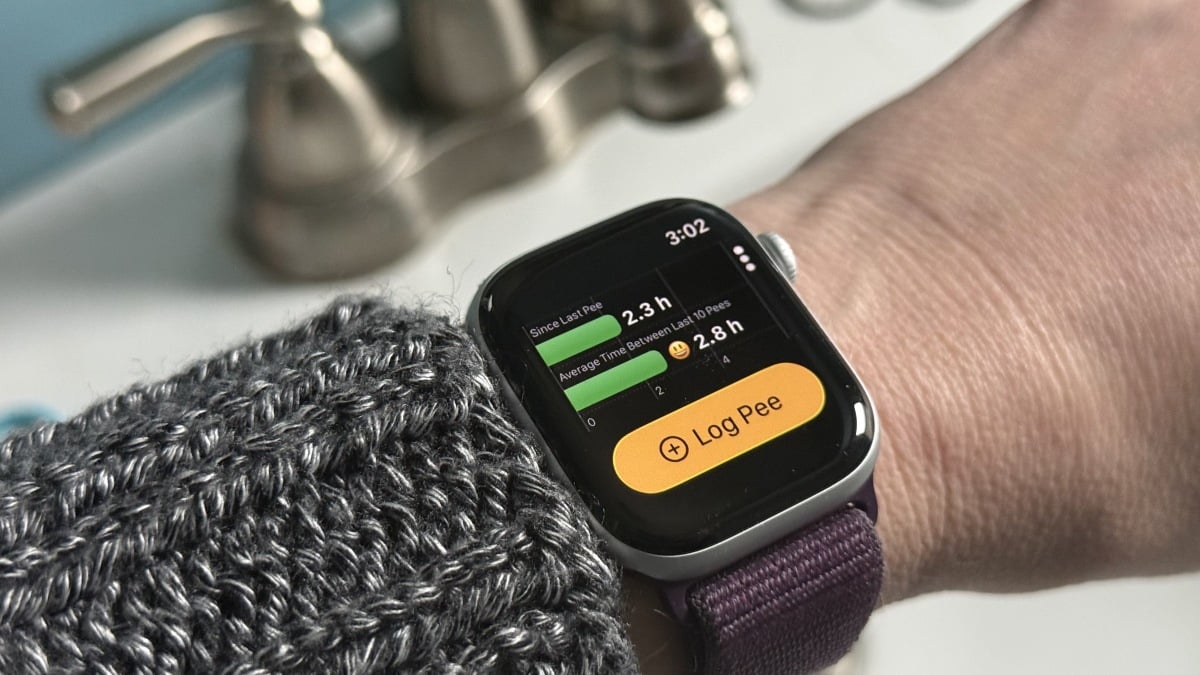
That’s why I was intrigued by the P Water app for iPhone and Apple Watch. It tracks exactly what you’d expect from the name. I’ve been using it for about a week, and so far, I’m a fan. I tap a button on my Apple Watch when I’m heading to the bathroom, and between pit stops, I can drink whatever I want without measuring or logging any of it. If it’s been a few hours since my last bathroom trip, the app will prompt me to drink water.
This approach means that I get full credit for the water in my soup and Diet Coke, because it’s still hydrating me, and my internal hydration level is still triggering my bathroom trips. I spend a total of about 30 seconds each day thinking about the app, and I measure nothing. This is ideal for me.
Why it makes sense to track urination rather than water intake
The developers of P Water were not the first to think of tracking water output rather than input. You may have noted this approach is sometimes used in medical settings, and as a new parent I remember being asked how many wet diapers my newborn was producing each day.
P Water cites research showing that counting up the number of times you urinate per day can give a reasonably good estimate of how hydrated you are. For example, this study on healthy young men concludes that “[Void frequency] is a reliable index of 24-[hour] hydration status” so long as bathroom visits come at a consistent “urgency”—in other words, if you sometimes go when you don’t really have to, but sometimes hold it a long time, your pee count will be less reliable as a hydration indicator. That much is pretty obvious.
Tracking output rather than input accounts for not just different sources of water in your diet, but also different hydration needs. For example, the “eight glasses of water a day” rule was never a particularly good one, especially when you consider that people come in different sizes and may have different activity levels.
What do you think so far?
That said, if you have a need to monitor your exact hydration, an app like P Water won’t necessarily do everything you need it to do. Medical providers often ask for specific amounts when they have people do what they call a “voiding diary.” But for a general sense of whether you’re hydrating enough that you’re peeing a normal amount, P Water seems to be a convenient tool.
How to use the P Water app (with or without an Apple Watch)
While it’s convenient to use P Water on an Apple Watch, it also works as a regular iPhone app. The full app has some convenient actions, like having a “log a pee” option when you long-press the home screen icon or when you swipe down to see Siri suggestions.
I only used the app’s most basic features—logging bathroom visits, basically—but there’s more in the settings. You can enter notes for each pee, or even use a “stealth mode” that removes the word “pee” entirely. (On the other hand, you can also lean in and ask it to use the word “piss.”) While the core functions are mostly free, some of these bonuses, like stealth mode, require a subscription ($4.99/month or $39.99/year).
Originally published at Lifehacker










Discussion about this post